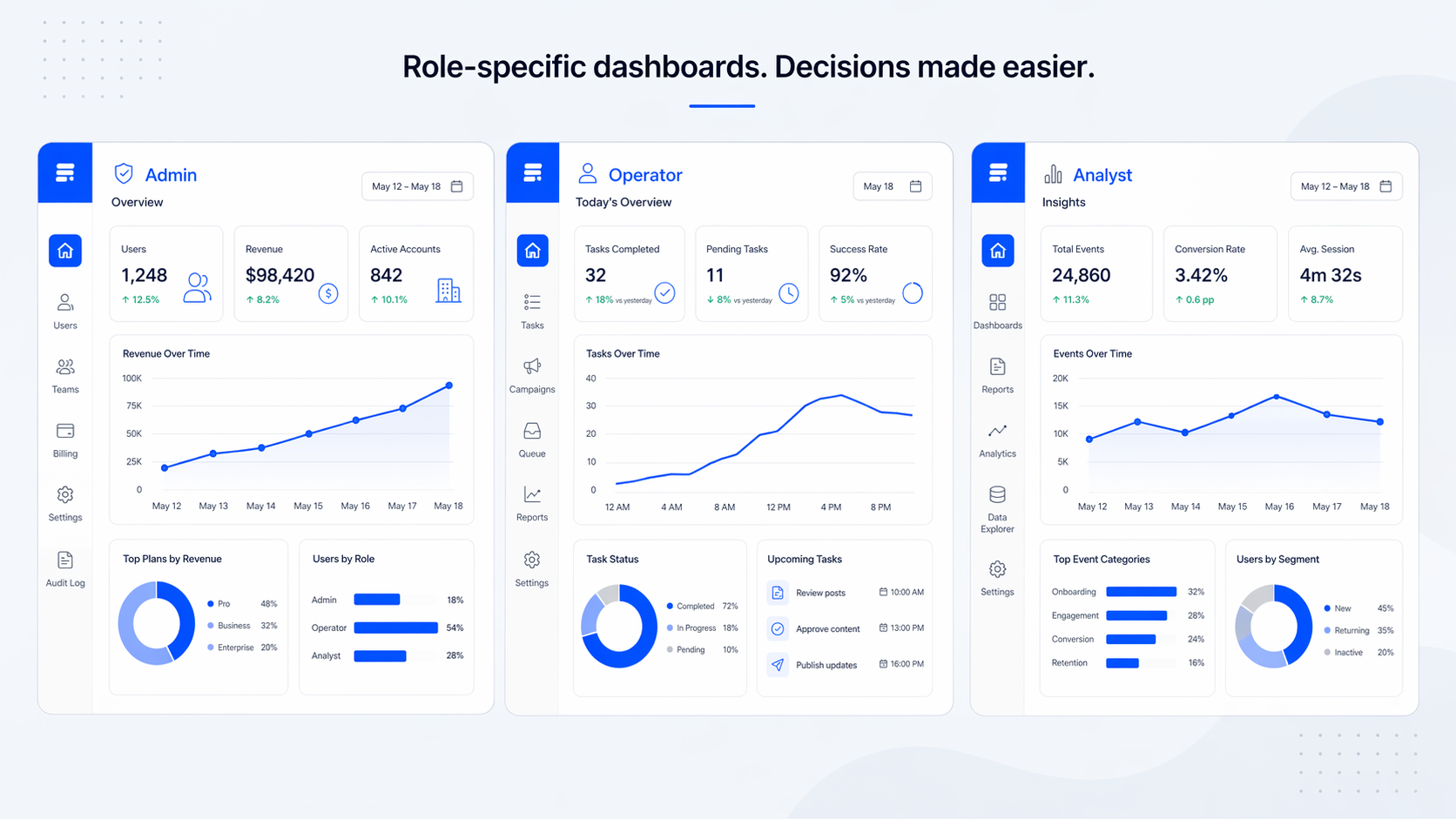
B2B SaaS dashboard design: principles that actually move user activation
Most B2B SaaS dashboards fail the same way. They try to be useful for everyone, so they end up being essential for no one. The admin gets the same view as the operator, the analyst sees the same KPIs as the founder, and everyone has to scroll past five rows of charts to find the one number that tells them whether today is a good day.
We've redesigned dashboards for products like RecurPost, Upmetrics, and WiserReview, and the pattern is always the same. The first dashboard was built by an engineer who wanted to show what the product could measure. The redesign has to start from a completely different question: what decisions does this user make, and what data supports those decisions?
This post is the set of principles we actually apply when a SaaS team asks us to fix a dashboard that nobody uses. It's not a survey of every best practice on the internet. It's the short list that moves the needle on activation and retention.

The real problem with most B2B dashboards is not complexity, it's genericness
The common advice is "simplify your dashboard." That advice is not wrong, but it skips the real issue. A B2B SaaS dashboard is not just complex because it has too many charts. It's complex because it tries to serve three or four user roles with one screen.
An admin wants to know if the system is healthy. An operator wants to know what needs their attention today. An analyst wants to export, compare, and explain. A founder wants the one line that says whether the business is growing. Forcing all four into the same view does not simplify anything. It makes every user do the same mental work: filter out the 80% that isn't for them.
In our experience, this is the first thing to fix. Not the charts, not the colors. The scope of who the dashboard is actually for.
Start with the decision, not the data
Before you place a single chart, write down the three questions a specific user role needs to answer every time they open this view. Not the data you have. The decisions they make.
For an operator: "Is anything on fire?" "What do I need to act on today?" "Did what I did yesterday work?" For a founder: "Are we growing?" "What's the one thing that changed?" "Is retention holding?" Those are different dashboards. Trying to answer all of them on one screen is the mistake most teams make.
Once you have the questions, the KPIs become obvious. Each question maps to one primary metric and maybe one or two supporting ones. If you can't tie a metric to a decision a user makes, cut it. That rule alone reduces most B2B dashboards by half.

We use a framework we call Data → Structure → Priority → Action
This is the sequence we run every dashboard project through. Skipping a step is how teams end up with a dashboard that looks polished but still doesn't get used.
Data. What data is actually available, at what refresh rate, and with what reliability. Real-time looks impressive in a pitch and costs four times more to maintain than most teams expect. Most B2B dashboards should refresh every 15 minutes, not every second.
Structure. How users group information in their heads. An operator thinks by account, then by status. An analyst thinks by time period, then by segment. The structure of the dashboard has to match the user's mental model, not the database schema.
Priority. Which metric deserves the top-left of the screen. There should be exactly one. The rest of the hierarchy flows from there. If two metrics are competing for the top spot, the view is trying to answer two questions, which means it should be two views.
Action. Every primary metric should have a next step attached. "MRR is down 8%" is data. "MRR is down 8%, see which accounts churned this week" is a dashboard that helps. Research from Nielsen Norman Group calls this a match between system and real world. The dashboard has to speak the user's language of decisions.
Role-based views beat universal dashboards
Every B2B SaaS product above a certain size has at least three user types on the same data. We design for that reality instead of against it.
The pattern we use most often: same data source, different primary view per role, shared detail views underneath. The admin sees system health first. The operator sees a daily task queue first. The analyst sees a time-range picker first. All three can drill into the same detail screens when they need to.
Progressive disclosure matters more here than in B2C. Power users want the advanced filters, but showing them to the 60% of users who don't need them increases time-to-insight by about 35%. Hide the advanced tools one layer down. Users who need them find them. Users who don't stay out of their own way.

What to strip: the most underused technique in dashboard design
Adding metrics is easy. Cutting them is the part nobody wants to do. It's also the part that actually improves the product.
Research from Baymard Institute and others consistently shows that dashboards exceeding around 12 KPIs see about 40% lower engagement. Working memory handles five to nine items at a time. A dashboard with 20 widgets is not a dashboard, it's a data dump.
Our rule when we redesign a dashboard: if a user can't name the specific action a metric is tied to within five seconds, we cut it. On the RecurPost redesign, that rule moved the main dashboard from around 18 widgets to eight. The team was nervous about it. Activation on the new dashboard went up inside the first month because users could finally see what mattered.
[HUMAN INPUT NEEDED: confirm the exact activation lift number for RecurPost dashboard widgets reduction, approximate figure used above]
Information hierarchy that actually works
The hierarchy in a good B2B dashboard is not a design decision, it's a reading order. Users scan roughly in an F-pattern, which means the top-left holds the most expensive visual real estate in the product.
Put the primary KPI there. Put the secondary KPIs along the top row. Push the detail charts into the middle and the configuration or filter controls into the right rail or collapsed panels. Empty space is not wasted space. It's how users find the primary metric in under two seconds.
Color hierarchy is the part most teams get wrong. Red, yellow, green for status without any supporting icon or label fails about 8% of users with color vision differences and also fails everyone on a bad monitor. We pair every status color with a short text label or an icon. "At risk" beats a yellow dot.

Pick the chart that matches the question, not the one that looks impressive
This is where a lot of B2B dashboards lose users. A 3D donut chart looks like a design decision. It's actually a comprehension tax.
Our short list, based on what users can read fastest:
- Bar charts for comparison between categories. Easy to read, about twice as accurate as pie or donut charts for length comparisons.
- Line charts for trends over time. One line per series, three series maximum per chart, otherwise it becomes a spaghetti problem.
- Single numbers with a delta for the hero KPIs. "$42,100 MRR, up 8% this month" is faster to read than any chart.
- Tables for detail views where users need to sort, filter, and export. Charts are not always the right answer.
Avoid pie charts for anything with more than three segments. Avoid stacked area charts for anything users need to compare precisely. If the chart makes the user pause to figure out what they're looking at, it's the wrong chart.
The common mistakes we see in B2B dashboards
These are the five things we flag first in every dashboard audit. Fixing any two of them usually moves activation.
- One dashboard for every role. The fastest way to make everyone feel mildly disappointed.
- Color-only status indicators. Fails the user on accessibility and fails them on a projector.
- Real-time everything. Costs four times more to maintain than batch refresh, and about 8% of dashboards actually need it.
- Drill-down on every number. Users who click, load, and scan three layers deep are users who have given up on the top-level view.
- No empty states. A new user opens the dashboard and sees zero charts. They assume the product is broken. Empty states should guide the first action, not apologize for missing data.
[HUMAN INPUT NEEDED: add a before/after screenshot from an internal dashboard redesign, one example from a SaaS audit]

FAQ
What's the difference between B2B and B2C dashboards?
B2C dashboards usually serve one user type with one job. B2B dashboards almost always serve multiple roles, have permission rules attached to the data, and are used by people who were assigned the tool rather than people who chose it. That last part changes everything about how forgiving a B2B dashboard has to be.
How many metrics should a B2B dashboard show?
Five to seven primary metrics on the main view, with everything else pushed into secondary tabs or drill-down panels. If you have more than nine widgets competing for the top of the screen, you're asking users to do the prioritization work you should have done for them.
Should B2B dashboards be user-customizable?
Usually no, not for the main view. Customization is a feature that looks good in a demo and gets used by about 10% of users. Design a strong default for each role first. Add rearrangement or widget-level personalization only after the default has stabilized.
What tools do we use for B2B dashboard design?
Figma for UI design, Maze or user interviews for validation, and real component libraries in the client's codebase for handoff. The tool matters less than the process. A dashboard prototyped in Figma without data edge cases will ship with broken states.
How long does a B2B dashboard redesign take?
A full redesign from audit to developer handoff typically takes four to eight weeks depending on how many roles and how much historical data is involved. Audit is usually one to two weeks. New IA and wireframes, two to three weeks. UI and handoff, two to three weeks.
How do you test a dashboard before launch?
Usability tests with three to five users per role, watching them answer the actual decision questions the dashboard was built for. If they can't answer within the first 30 seconds, the hierarchy is wrong. We test the empty state, the overloaded state, and the role-switched state separately, because those are the three places dashboards usually break.
Ready to see where your dashboard leaks users?
A good B2B SaaS dashboard doesn't try to do more. It removes everything that isn't helping a specific user make a specific decision. That's the hard part, and it's the part we spend most of the project on.
If your team is staring at a dashboard that looks full and feels empty, a structured audit usually surfaces the fix faster than another round of internal debates. You can see how we approach SaaS product work on our portfolio, or read our related piece on SaaS onboarding design for the upstream view of what users do before they hit the dashboard. When you're ready, talk to our team about a dashboard audit for your product.
Leave a Reply